Check in with yourself – in seconds, without searching for your iPhone
Your iPhone is in your pocket. The thought is there. Now. In 3 seconds, you've tracked your habit – right from your wrist. No unlocking, no app opening, no lost thought.

Why the iPhone is too cumbersome
"Where's my iPhone?" – The thought is gone
You just meditated. The impulse is there: "I should track that." But the iPhone is... where? In your pocket? In another room? By the time you found it, unlocked Face ID, opened the app – the thought is gone. The moment is over. Not tracked again. ADHD brain: 1, Habit tracker: 0.
Too many steps – too much friction
Unlock iPhone. Find app. Open. Navigate. Enter. 5 steps – too much for a quick check-in. With ADHD, friction is the killer. Every additional second between thought and action increases the chance you'll forget it. So: forgotten.
The flow gets interrupted
After the workout. After meditation. In the moment when you feel the habit – you don't want to spend 30 seconds with your iPhone. You just want: Check. Done. Continue in the flow.
DopaLoop on the Watch: Seconds, not minutes
Raise your wrist. Tap. Done. Tracking has never been this fast.
3 seconds. Done.
Raise your wrist. Tap the habit. Done. 3 seconds, without thinking. The thought stays fresh. The moment is captured. Your progress grows – because tracking is so easy that you actually do it.
Your day at a glance
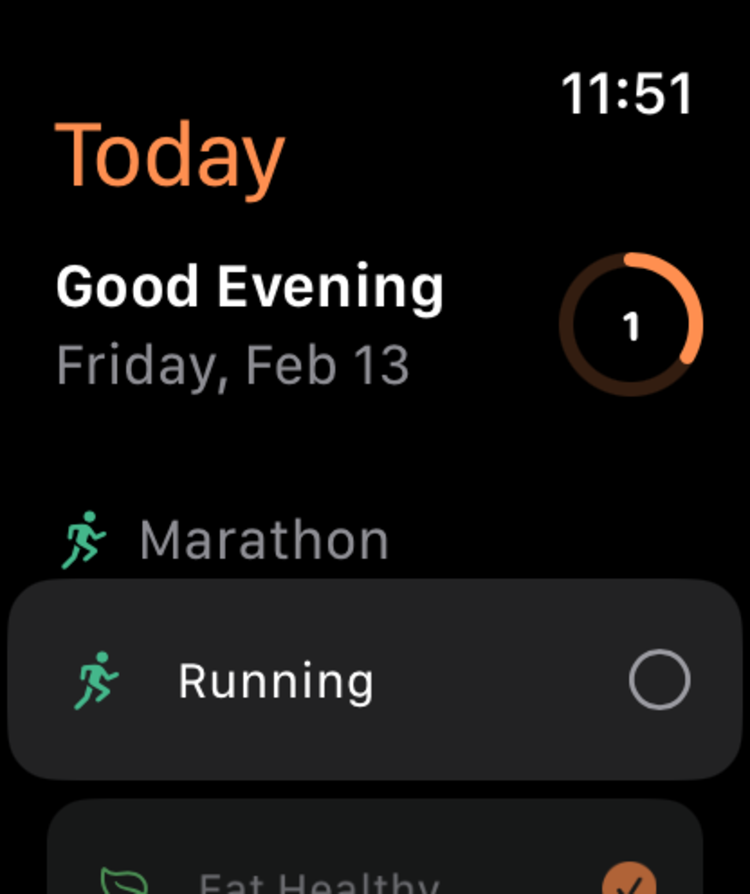
Which habits are still open today? One glance at your wrist – you know immediately. No opening, no scrolling, no searching. Your progress is always present. No surprises in the evening.
Watch and iPhone in sync – locally
Captured on the Watch, visible on the iPhone. Automatic synchronization – everything stays local on your devices. No cloud, no server. Just your devices talking to each other.
Your progress – always visible
Add DopaLoop as a Watch Face complication. Your daily progress – always visible, without opening the app. One glance is enough. You know where you stand.
The difference
27 seconds – if you even remember
- 1.Find iPhone (10 seconds)
- 2.Unlock with Face ID (3 seconds)
- 3.Find app (5 seconds)
- 4.Open app (2 seconds)
- 5.Navigate to habit (5 seconds)
- 6.Track (2 seconds)
2 seconds – every time
- 1.Raise wrist (0.5 seconds)
- 2.Tap habit (1 second)
- 3.Done (0.5 seconds)
The difference: You actually do it.
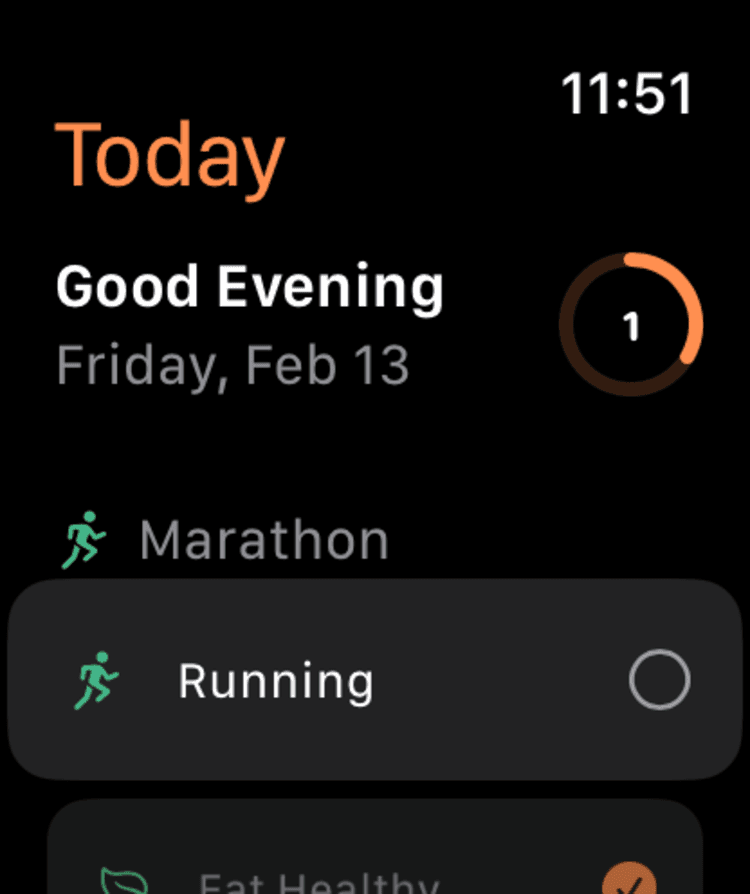
Quick check-in from your wrist
Track your habits directly on Apple Watch. One tap for check-in, without pulling your iPhone out of your pocket.
From the developer — why the Watch sticks
Why the Watch app turned out to matter more than I expected
I'm Stephan, 48, diagnosed with ADHD at 47, and I originally built the DopaLoop Watch app as a "nice to have." Basically the mandatory exercise — a serious iOS habit app should have a Watch app. Three months after launch I use it more often than the iPhone app myself.
This page explains why. And what design choices under the hood differentiate the Watch app from what most other habit trackers ship in their watch module.
Why the Watch fits ADHD brains better than the phone
The phone is a distraction device. It's designed to hold your attention — through notifications, app icons, news feeds, push alerts. For an ADHD brain whose reward system already fires hard on novelty cues, that's a minefield. You meant "quickly tick a habit," you end up on Instagram, and twenty minutes later you've forgotten what you actually wanted to do.
The Watch structurally has less of this problem. It has no news feed. It has a tiny display that makes long scroll sessions impossible. It's set up for short, precise interactions — three seconds, done.
For ADHD brains that isn't "small display, so less information." It's "fewer options, so less decision fatigue." (Why fewer decisions.) A habit entry should take 5 seconds. It can't cost more if it has to happen daily.
Russell Barkley coined the concept of "temporal myopia" in his 1997 self-regulation work — a measurable nearsightedness toward future consequences that is more pronounced in ADHD. Translated for daily life: with ADHD, time is split into two parts — the now (what's on the radar) and the not-now (what isn't). A wrist tap that shifts the habit entry into the now bypasses exactly the structure where the ADHD brain usually fails.
What the DopaLoop Watch app concretely does
1. Log habits directly from the watch. You open the app, see your goal list with linked habits, tap one, choose intensity 0–5 with the Digital Crown or a tap. Three seconds. Syncs to the iPhone in the background.
2. Complications for watch faces. You can set a habit as a complication on your watch face — e.g., your most important goal-item of the day. One tap and you're in the detail view, ready to log. No detour through the watch app list.
3. HealthKit tracking seamlessly. Movement habits, sleep habits, mindfulness minutes: if you link them to HealthKit in the iPhone app, detection runs via the watch sensors and fills the app automatically. You don't enter anything manually when the watch already knows the workout.
4. Reminders that don't intrude. Reminders on the watch are a haptic tap on your wrist, not a notification sound. With ADHD-typical reduced stimulus filtering, that's a different mode from a phone push. You can configure frequency and time-of-day per habit.
What's different under the hood
The Watch app doesn't sync via iCloud. Two reasons:
Architectural: DopaLoop is local-only. There's no server, no user DB, no cloud account. Data lives in the app-group SQLite database on your iPhone. If I needed iCloud for the watch, the privacy promise would collapse.
Technical: iCloud sync between iPhone and Watch is in practice often frustratingly slow — many habit trackers on the Watch show data that's 2–3 hours stale. DopaLoop uses Apple's WatchConnectivity framework instead: direct device-to-device sync, real-time when "reachable," background updates via transferUserInfo when the watch isn't active. Entries on the watch land on the iPhone within roughly 200 milliseconds when both devices are in range.
That isn't "better for everyone." If you ever use the watch without the iPhone nearby (e.g., cellular Watch for running), the initial setup of the habit list won't work without iPhone contact. But for the realistic use case — both devices together, in daily use — sync is meaningfully faster and more private than the iCloud variant.
What I use the Watch app for most often
Concretely, because abstract lists are less useful:
- Morning coffee. Tick three habits without pulling the phone out of my pocket. Saves me the Instagram rabbit-hole I'd otherwise have at 7:30.
- Sports / outdoors. Run habit auto-detects via HealthKit as soon as I start. During the run I see on the complication that today's "movement" habit already registered — a small dopamine hit, on the side.
- Before sleep. Reflection habit at intensity 4 via Digital Crown, click. Ten seconds. Instead of looking at the phone, which measurably reduces sleep quality. (Why blue light at night hits hard.)
- In meetings. When something I wanted to log occurs to me during a call: quick wrist tap, log, on with the conversation. Nobody notices. My reward system gets the checkmark moment without the meeting collapsing.
When the Watch app isn't for you
Concretely:
- You don't have an Apple Watch and don't plan to. (Buying a Watch just for DopaLoop would be absurd — the app doesn't justify that.)
- You're an Android user. DopaLoop is iOS-only and there's no Galaxy Watch or Pixel Watch version.
- You use the Watch mostly without the iPhone nearby. The direct WatchConnectivity sync only works when the iPhone is in range.
If you have Apple Watch + iPhone + an ADHD brain profile together, the DopaLoop Watch app is the piece that shifts the experience from "another habit tracker" to "tool I actually use daily." That was my own surprise — and the most honest recommendation I can make for the app.
FAQ
About the author
Stephan Eberle · Founder, DopaLoop
I'm Stephan, a senior engineer with 25+ years on the job and a late-diagnosed ADHDer. I'm building DopaLoop for the brains that standard habit trackers grind down — private, on-device, goals-first. On Medium I write openly about shipping anxiety, hyperfocus, and the rabbit-hole portfolio effect.
Track from your wrist
No searching, no waiting, no lost thought. Just your progress – in real-time.